
Effects & FX Chains
An effect shapes a track's sound: reverb, delay, EQ and more. Every track, group and the master bus has its own chain, and nine studio effects come built in.
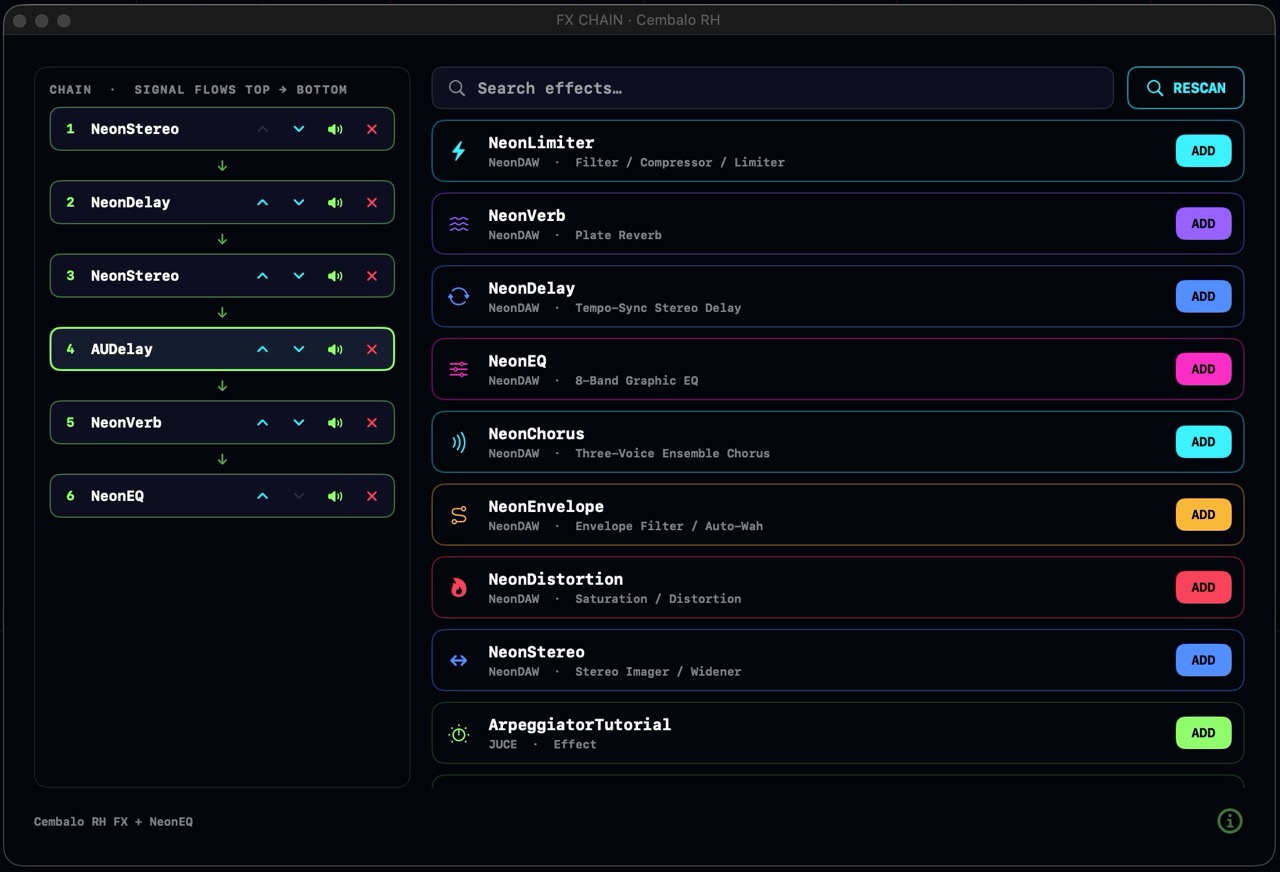
The FX chain
Click the FX button on a track header, a group header, or a mixer strip to open that channel's effects window. The chain sits on the left, the effect browser on the right.
- Signal flows top to bottom. The first effect in the list hears the track first, the last one hears everything above it. An EQ before a reverb sounds different from an EQ after it.
- Add an effect: click ADD next to any effect in the browser. It joins the bottom of the chain.
- Reorder: the up and down arrows on each row move the effect through the chain.
- Bypass: the speaker icon silences one effect without removing it. Its settings are kept.
- Remove: the red ✕ takes the effect out of the chain.
- Open the panel: click an effect's row and its own window opens, ready to tweak.
Everything here works while the music plays. Add an effect mid-chorus, sweep a knob, reorder the chain: you hear the change right away.
FX presets
Every built-in effect shares the same preset bar at the top of its panel.
- The ◀ and ▶ buttons step through the factory bank in order.
- The preset menu lists your saved presets under USER and the factory bank under FACTORY.
- The save button stores the current settings under a name you choose. Saved presets appear on every copy of that effect, in every project.
- To delete a user preset, click the trash icon next to it in the menu and confirm.
Third-party Audio Units
NeonDAW hosts Audio Unit (AU) effects, the native Mac plugin format. Most plugin makers who release a VST also ship an AU build, so check your plugin's installer for it. NeonDAW does not load VST or VST3 plugins.
- Install the AU on your system and it is detected automatically.
- If it doesn't show up, hit RESCAN in the effect browser.
- Add it to the chain like any built-in effect. Clicking its row opens the plugin's own interface in a floating window.
Master and group FX
The master bus has a chain too: everything in the project passes through it last. Open it from the FX button next to the master fader in the transport bar, or from the master strip in the mixer. It's the place for a gentle bus compressor, a final EQ, or a limiter.
A group's FX chain processes every track inside the group at once. One reverb on a group of backing vocals treats them as a single section, and costs less CPU than a reverb per track.
Automating effect parameters
Open the effect's panel, right-click the knob you want to automate, and choose Create Automation Channel. A lane for that parameter appears on the track: draw your moves, and the knob follows during playback.
Third-party AU plugins draw their own interfaces, so their knobs don't have this menu. For those, right-click the effect's row in the chain instead and pick the parameter from the Automation menu. See Automation for drawing and editing lanes.
NeonEQ · 8-band parametric EQ
Shape any sound with your eyes as much as your ears. The live spectrum plays behind the glowing response curve, and the eight band handles drag directly on it: left and right for frequency, up and down for gain, scroll to change the width (Q). Band 1 is a low shelf, bands 2 to 7 are bells, band 8 is a high shelf.
Controls: per-band FREQ, GAIN and Q, plus an OUT knob: a ±12 dB output trim that lifts or lowers the whole curve at once.
Presets: 35 factory curves, grouped by source: Voice, Drums, Band, Strings, Winds, Ensemble, Genre and Polish. Lead Vocal, Kick Drum, De-Mud and De-Harsh are good first reaches.
NeonLimiter · filter / compressor / limiter
Glue, punch and loudness in one insert. A filter section trims the extremes, a compressor evens the level, and a limiter catches the peaks. The live scope draws the signal before and after, so you can see exactly what you're catching.
Controls: LOW CUT and HIGH CUT filters, then THRESH, RATIO, ATTACK, RELEASE, GAIN (makeup) and CEILING.
Presets: 9, from Gentle Glue and Master Bus through Drum Punch, Vocal Leveler and Hard Ceiling to Lo-Fi Crush.
NeonVerb · plate reverb
From a tight room to a tail that hangs forever. A classic plate that gives vocals a silky sheen and drums somewhere to breathe.
Controls: SIZE and DECAY set the space, DAMP and TONE shape how the tail darkens, PRE-DLY pushes the reverb behind the dry sound, BASS and LO CUT keep the low end tidy, MIX blends it in.
Presets: 10, from Tight Room, Studio Room and Ambience through Vocal Plate and Warm Hall to Cathedral and Endless.
NeonDelay · tempo-synced stereo delay
Echoes that lock to your track. With SYNC on, the delay time follows the project tempo at the division you pick: 1/16, 1/8 triplet, 1/8, dotted 1/8, 1/4, dotted 1/4 or 1/2. Turn the TIME knob live and the tail pitch-bends like a tape machine.
Controls: TIME (free milliseconds, or a synced division), FEEDBACK for the number of repeats, TONE to darken each repeat as it fades, PONG to bounce repeats across the stereo field, MIX to blend.
Presets: 8, from Slapback and Eighth Echo through Ping-Pong 8th and Dotted Groove to Dub Wash and Long Haze.
NeonChorus · ensemble chorus
Turn one voice into many. Up to three detuned voices per channel widen a thin synth into a lush ensemble. At one voice it doubles as a flanger or a true vibrato.
Controls: RATE and DEPTH set the wobble, DELAY sets the doubling distance, FEEDBK adds flange-style swirl, VOICES picks 1 to 3 layers per side, WIDTH spreads them, MIX blends. Full wet with one voice is pure vibrato.
Presets: 7: Subtle Shine, Classic Chorus, Lush Ensemble, Wide 80s, Deep Wobble, Flange Zone and Vibrato.
NeonStereo · stereo imager / widener
Push a sound wall to wall without it falling apart in mono. WIDTH is mid/side based, so a mono fold-down stays identical at any setting. The built-in goniometer and correlation meter keep you honest.
Controls: WIDTH scales the existing stereo image, SPREAD creates width where none exists, BASS keeps everything below its corner frequency locked to the center, MONO auditions the mono fold-down, OUTPUT trims the level.
Presets: 8, from Gentle Open and Wide Bus through Master Safe, Vinyl Safe, Mono Maker and Mono To Stereo to Huge Pad and Super Wide.
NeonDistortion · saturation / distortion
From a whisper of tape warmth to a speaker torn in half. Four characters set the flavor: TAPE (smooth saturation), TUBE (asymmetric, even harmonics), FUZZ (hard clip) and FOLD (west-coast wavefolder). The whole thing is oversampled, so it's all heat and no digital fizz.
Controls: the character switch, DRIVE for how hard you push, BIAS to skew the shape, TONE to tame the top, TIGHT to firm up the low end, MIX for parallel grit, OUTPUT to level-match.
Presets: 8, from Gentle Glow and Tape Warmth through Tube Stage, Parallel Heat and Crunch to Fuzz Pedal, Broken Speaker and Foldback.
NeonEnvelope · envelope filter / auto-wah
Make anything talk, quack and squelch. The filter follows how hard you play: dig in and the resonant peak sweeps up (or down) by as much as four octaves, so a flat bassline suddenly bounces.
Controls: FREQ sets the resting point, RES sets the bite, SENS sets how far your playing pushes the sweep, UP and DOWN pick the direction, ATTACK and RELEASE shape how fast it opens and closes, MIX blends.
Presets: 7: Quack Bass, Funk Guitar, Synth Bloom, Rubber Band, Down Wah, Subtle Touch and Thin Whip.
NeonPitch · pitch correction
Real-time pitch correction as an insert effect. Set the KEY and SCALE and NeonPitch pulls the performance toward the right notes: ease it back for transparent polish, or crank it for the full robotic snap. The RETUNE, CORRECT, HUMANIZE and MIX knobs set the character, and FUSE joins notes in its editor.
Presets: 8, from Hard Tune and Tight Pop to Vibrato Safe, Subtle Polish and Parallel Shine.
NeonPitch also has a full note editor for drawing corrections by hand: see Audio Clip Tools.
Chain order is a creative choice. Try distortion into delay for dirty echoes, or delay into distortion so every repeat gets crunchier. Nothing is destructive: reorder and compare.